SOAR for Cloud Security: From Alert Fatigue to Automated Response
Your SOC is drowning in alerts while attackers move in minutes. Learn how SOAR platforms automate cloud security response with practical playbook examples for AWS, Azure, and GCP.
The Arithmetic of Alert Fatigue
Security operations centers generate alerts at a pace no human team can match. The average enterprise SOC receives between 10,000 and 11,000 alerts daily, according to recent industry surveys. If your analysts could triage one alert per minute—and sustain that pace without breaks, context switching, or documentation—clearing that queue would require 167 hours of continuous work. For an 8-hour shift with a realistic 6 hours of productive analyst time, you'd need 28 analysts working simultaneously just to keep up with triage, let alone investigation or response.
The numbers get worse when you factor in cloud environments. Organizations running workloads across AWS, Azure, and GCP often see 3x the alert volume of their on-premises counterparts because cloud-native security tools generate findings at a granularity that traditional tools never approached. Every API call logged, every configuration change flagged, every network flow analyzed.
This isn't a staffing problem. Even if you could hire enough analysts—and the security talent shortage makes that unlikely—throwing bodies at exponentially growing alert volumes only delays the inevitable. The solution requires architectural change: shifting repetitive investigation and response tasks from humans to machines.
Security Orchestration, Automation, and Response (SOAR) platforms enable that shift. They connect your security tools, automate investigation workflows, and execute response actions in seconds rather than hours. The question isn't whether your organization needs automation. The question is how quickly you can implement it before alert fatigue creates the blind spot an attacker exploits.
Understanding SOAR: Three Capabilities Working Together
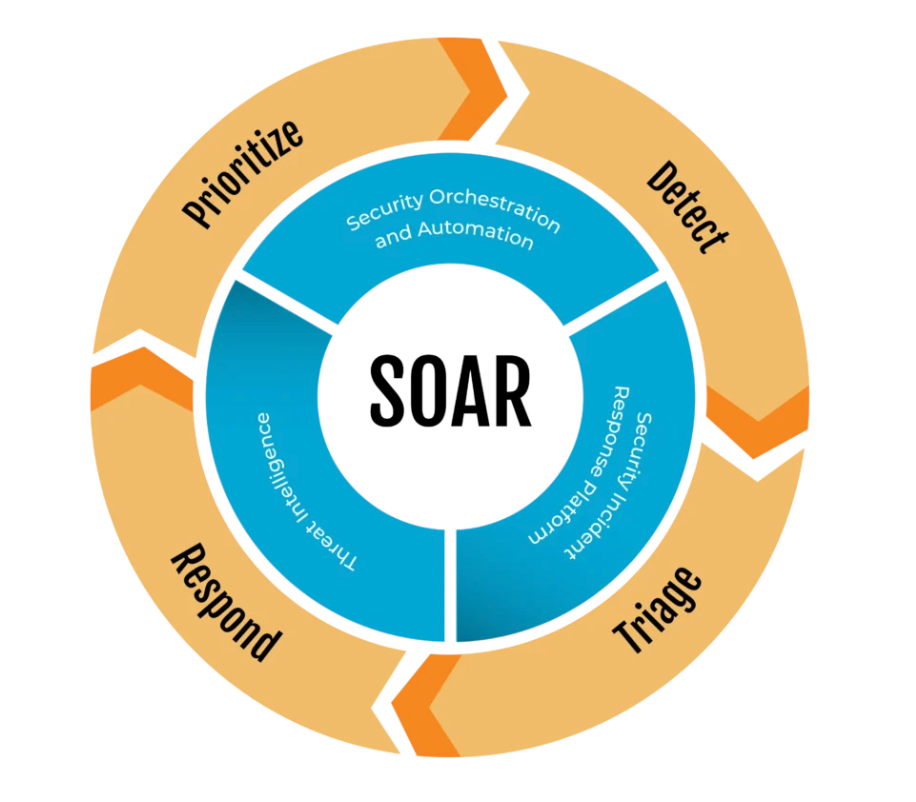
SOAR platforms combine three distinct capabilities that reinforce each other. Orchestration connects disparate security tools into a unified ecosystem. Automation executes predefined workflows without human intervention. Response takes containment and remediation actions when threats are confirmed.
The orchestration layer solves the integration problem that has plagued security operations since organizations started deploying specialized tools. Your SIEM ingests logs. Your EDR monitors endpoints. Your cloud security posture management tool flags misconfigurations. Your threat intelligence platform maintains indicator databases. Without orchestration, analysts manually pivot between consoles, copy-pasting indicators and mentally correlating data. SOAR platforms connect these tools through APIs, enabling automated data flow and coordinated action.
The automation layer executes playbooks—predefined workflows that codify your response procedures. A well-designed playbook handles a scenario from initial alert through investigation to response without human intervention. When a phishing email is reported, the playbook extracts URLs and attachments, detonates them in a sandbox, queries threat intelligence, identifies other recipients in your organization, quarantines the message from all inboxes, and blocks the sender domain. Each step happens in seconds. What previously required 30-45 minutes of analyst time completes before most organizations would have assigned the ticket.
The response layer takes action. This ranges from low-risk enrichment (adding context to alerts) through medium-risk containment (isolating systems, revoking credentials) to high-risk remediation (deleting malicious files, rolling back configurations). The appropriate automation level depends on detection confidence, potential blast radius, and your organization's risk tolerance. Most teams start with enrichment-only playbooks, graduating to automated containment after building confidence in their detection accuracy.
The SOAR Market in 2025
The SOAR market reached approximately $1.6 billion in 2024 and continues growing at 15-18% annually as organizations recognize that manual security operations cannot scale with cloud adoption and threat volume. The competitive landscape has shifted significantly over the past two years, with consolidation reshaping how organizations acquire SOAR capabilities.
Integrated SIEM-SOAR platforms now dominate enterprise deployments. Microsoft Sentinel includes automation rules and Logic Apps-based playbooks natively. Splunk's acquisition of Phantom created Splunk SOAR, tightly integrated with the Splunk ecosystem. Google Chronicle includes SOAR capabilities through the Chronicle Security Operations suite. Palo Alto Networks' Cortex XSOAR remains the standalone market leader, though it increasingly integrates with the broader Cortex XDR platform. These integrated approaches reduce deployment complexity but may limit flexibility for organizations with heterogeneous security stacks.
Cloud-native SOAR platforms have emerged as alternatives to legacy tools designed for on-premises environments. Tines, Torq, and Blink offer API-first architectures, no-code playbook builders, and serverless execution models that align better with cloud-native security workflows. These platforms typically offer faster time-to-value for cloud security use cases, though they may lack the deep integrations with legacy security tools that established platforms provide.
AI-enhanced SOAR represents the most significant recent development. Every major platform has introduced generative AI capabilities in 2024-2025. Natural language playbook creation allows analysts to describe workflows conversationally rather than through visual builders or code. Automated investigation summaries compress hours of log analysis into readable narratives. AI-assisted triage recommends response actions based on historical patterns. These capabilities don't replace human judgment but dramatically accelerate the investigation process.
Open-source alternatives like Shuffle and TheHive provide SOAR capabilities without licensing costs. They require more operational investment—you'll need staff comfortable with container orchestration, API integration, and ongoing maintenance—but offer complete customization and avoid vendor lock-in. For organizations with strong DevOps culture and limited security budgets, open source can provide capable automation.
Before purchasing a standalone SOAR platform, audit your existing tools. You may already have automation capabilities you're not using:
# Check for existing Splunk SOAR capabilities
splunk search '| rest /services/apps/local | search title="*phantom*" OR title="*SOAR*"'

# List playbooks in Splunk SOAR
curl -k -u admin:password https://splunk-soar:8443/rest/playbook \
  | jq '.data[] | {name: .name, active: .active, runs: .runs}'

# Audit Microsoft Sentinel automation rules
az sentinel automation-rule list \
  --resource-group security-rg \
  --workspace-name sentinel-workspace \
  --query '[].{Name:name, Enabled:properties.enabled, LastModified:properties.lastModifiedUtc}' \
  --output table

# Check Cortex XSOAR playbook inventory
demisto-sdk find -i Playbooks/ --type playbook

# List Chronicle SOAR rules
curl -X GET \
  "https://chronicle.security.google.com/v1/projects/${PROJECT}/locations/${REGION}/rules" \
  -H "Authorization: Bearer $(gcloud auth print-access-token)"
Selecting the Right Platform
Platform selection should precede playbook design. The right tool depends on your existing security stack, cloud footprint, team capabilities, and budget constraints.
Integration requirements matter most. List every security tool that should connect to your SOAR platform. For each tool, verify whether the SOAR platform offers a maintained integration, whether that integration supports both read operations (pulling data) and write operations (taking actions), and what authentication mechanisms it requires. A platform with 500 integrations provides no value if it lacks connectors for your critical tools.
Cloud provider alignment affects both integration depth and pricing. Microsoft Sentinel offers the deepest Azure integration but requires additional configuration for AWS and GCP environments. Chronicle SOAR naturally integrates with GCP Security Command Center. AWS-centric organizations might evaluate Amazon Security Lake combined with third-party SOAR platforms. Multi-cloud environments typically benefit from cloud-agnostic platforms like Cortex XSOAR or Tines.
Team skillsets determine implementation velocity. Visual playbook builders lower the barrier to automation but may limit advanced workflows. Code-based platforms (like Tines' story builder or custom Python in XSOAR) offer more flexibility but require development skills. Match platform complexity to team capabilities—an overly sophisticated platform that nobody can use provides no value.
Total cost of ownership extends beyond licensing. Factor in implementation services, integration development for tools without native connectors, ongoing maintenance, and training. Open-source platforms eliminate licensing costs but transfer that investment to operational overhead. Cloud-native platforms often use consumption-based pricing that can escalate unpredictably with alert volume growth.
Designing Effective Playbooks
Playbooks encode your security procedures into executable workflows. Well-designed playbooks handle scenarios end-to-end with minimal human intervention. Poorly designed playbooks create technical debt, generate false actions, and erode analyst trust in automation.
Start with High-Value Scenarios
Not every alert type benefits equally from automation. Prioritize scenarios that are high volume (frequent enough to justify development investment), low complexity (follow predictable investigation patterns), and well-understood (your team knows the correct response actions). Phishing triage, cloud resource misconfiguration, failed authentication investigation, and known malware detection typically offer the best initial automation ROI.
Avoid starting with scenarios requiring complex judgment, accessing sensitive systems, or having high blast radius if automation fails. Insider threat investigation, business email compromise, and advanced persistent threat response benefit from automation-assisted enrichment but shouldn't fully automate response actions until your automation track record is established.
Design for Graceful Degradation
Every playbook should handle three outcomes: successful automated resolution, escalation requiring human judgment, and error conditions requiring troubleshooting. Playbooks that only handle the happy path fail silently when encountering edge cases, leaving incidents unaddressed.
Build explicit escalation paths. When automated investigation produces ambiguous results, create a ticket with all gathered context and assign it to an analyst. When response actions fail, alert on-call staff rather than simply logging the failure. When external services are unavailable, queue actions for retry rather than abandoning the workflow.
Example: Cloud Storage Exposure Response
Public cloud storage exposure requires rapid response. Data exfiltration can begin immediately upon discovery, and regulatory notification timelines start ticking. This playbook investigates and remediates exposed storage while documenting actions for compliance purposes:
# storage-exposure-response.yaml
name: "Respond to Public Cloud Storage"
description: "Investigate and remediate publicly exposed storage across AWS, Azure, and GCP"

triggers:
  - source: aws_config
    rule_identifier: "s3-bucket-public-read-prohibited"
  - source: azure_policy
    rule_identifier: "storage-account-public-access"
  - source: gcp_scc
    category: "PUBLIC_BUCKET"

inputs:
  resource_id: "{{ trigger.resource_identifier }}"
  cloud_provider: "{{ trigger.source_cloud }}"

steps:
  - id: get_resource_metadata
    action: cloud.get_storage_metadata
    provider: "{{ inputs.cloud_provider }}"
    resource: "{{ inputs.resource_id }}"
    outputs: [resource_metadata, owner_tags, creation_date]

  - id: sample_contents
    action: cloud.list_storage_objects
    provider: "{{ inputs.cloud_provider }}"
    resource: "{{ inputs.resource_id }}"
    limit: 1000
    outputs: [object_list, total_object_count]

  - id: classify_data
    action: dlp.classify_samples
    objects: "{{ steps.sample_contents.object_list }}"
    classification_rules: ["PII", "PHI", "PCI", "CREDENTIALS", "SOURCE_CODE"]
    outputs: [sensitivity_level, classification_details, sensitive_object_count]

  - id: lookup_owner
    action: identity.resolve_owner
    tags: "{{ steps.get_resource_metadata.owner_tags }}"
    fallback_method: "cloudtrail_creation_event"
    outputs: [owner_identity, owner_email, owner_manager]

  - id: check_approved_public
    action: cmdb.check_exception
    resource_id: "{{ inputs.resource_id }}"
    exception_type: "approved_public_storage"
    outputs: [exception_exists, exception_justification, exception_expiry]

  - id: block_public_access
    action: cloud.block_storage_public_access
    provider: "{{ inputs.cloud_provider }}"
    resource: "{{ inputs.resource_id }}"
    condition: |
      steps.classify_data.sensitivity_level in ['HIGH', 'CRITICAL']
      AND NOT steps.check_approved_public.exception_exists
    outputs: [remediation_status, previous_policy]

  - id: create_case
    action: case_management.create
    title: "Public Storage Exposure: {{ inputs.resource_id }}"
    severity: "{{ steps.classify_data.sensitivity_level }}"
    assignee: "{{ steps.lookup_owner.owner_email }}"
    description: |
      ## Summary
      Storage resource {{ inputs.resource_id }} was publicly accessible.

      ## Classification
      - Sensitivity: {{ steps.classify_data.sensitivity_level }}
      - Sensitive objects: {{ steps.classify_data.sensitive_object_count }} of {{ steps.sample_contents.total_object_count }}
      - Classifications found: {{ steps.classify_data.classification_details }}

      ## Ownership
      - Owner: {{ steps.lookup_owner.owner_identity }}
      - Manager: {{ steps.lookup_owner.owner_manager }}

      ## Remediation
      {% if steps.block_public_access.remediati 'success' %}
      Public access automatically blocked. Previous policy preserved for rollback if needed.
      {% elif steps.check_approved_public.exception_exists %}
      Approved exception exists: {{ steps.check_approved_public.exception_justification }}
      Exception expires: {{ steps.check_approved_public.exception_expiry }}
      {% else %}
      Manual remediation required - automated action not taken.
      {% endif %}
    outputs: [case_id, case_url]

  - id: notify_stakeholders
    action: communication.send_notification
    channels: ["email", "slack"]
    recipients:
      - "{{ steps.lookup_owner.owner_email }}"
      - "{{ steps.lookup_owner.owner_manager }}"
      - "security-incidents@company.com"
    template: "storage_exposure_notification"
    variables:
      resource_id: "{{ inputs.resource_id }}"
      sensitivity: "{{ steps.classify_data.sensitivity_level }}"
      case_url: "{{ steps.create_case.case_url }}"
      action_taken: "{{ steps.block_public_access.remediation_status | default('pending_review') }}"
Example: Credential Compromise Containment
Compromised credentials require immediate containment across multiple systems. Every minute of delay extends the attacker's access window. This playbook executes containment while preserving forensic evidence:
# credential-compromise-containment.yaml
name: "Contain Compromised Cloud Credentials"
description: "Immediate containment and forensic preservation for credential compromise"

triggers:
  - source: aws_guardduty
    finding_types: ["UnauthorizedAccess:IAMUser/*", "CredentialAccess:IAMUser/*"]
  - source: azure_sentinel
    alert_types: ["Suspicious credential access", "Impossible travel"]
  - source: crowdstrike
    alert_types: ["CredentialTheft", "IdentityProtection"]

inputs:
  principal_id: "{{ trigger.principal }}"
  cloud_provider: "{{ trigger.cloud }}"
  detection_source: "{{ trigger.source }}"

steps:
  - id: enrich_identity
    action: iam.get_principal_details
    provider: "{{ inputs.cloud_provider }}"
    principal: "{{ inputs.principal_id }}"
    outputs: [user_info, access_keys, active_sessions, attached_policies, group_memberships]

  - id: gather_activity
    action: cloud.query_audit_logs
    provider: "{{ inputs.cloud_provider }}"
    principal: "{{ inputs.principal_id }}"
    lookback_hours: 72
    outputs: [activity_log, unique_source_ips, unique_actions, accessed_resources]

  - id: analyze_behavior
    action: analytics.detect_anomalies
    baseline_period_days: 30
    current_activity: "{{ steps.gather_activity.activity_log }}"
    outputs: [anomaly_score, anomalous_actions, risk_indicators]

  - id: check_ip_reputation
    action: threatintel.bulk_lookup
    indicators: "{{ steps.gather_activity.unique_source_ips }}"
    sources: ["virustotal", "abuseipdb", "greynoise", "internal_blocklist"]
    outputs: [ip_verdicts, malicious_ip_count, tor_exit_nodes, known_vpns]

  - id: calculate_confidence
    action: logic.evaluate
    expression: |
      threat_score = 0
      if steps.check_ip_reputation.malicious_ip_count > 0: threat_score += 40
      if steps.analyze_behavior.anomaly_score > 0.8: threat_score += 30
      if 'impossible_travel' in steps.analyze_behavior.risk_indicators: threat_score += 20
      if steps.check_ip_reputation.tor_exit_nodes > 0: threat_score += 10
      return threat_score
    outputs: [threat_confidence_score]

  - id: disable_credentials
    action: iam.disable_principal_access
    provider: "{{ inputs.cloud_provider }}"
    principal: "{{ inputs.principal_id }}"
    actions:
      - disable_access_keys
      - disable_console_access
      - revoke_active_sessions
    condition: "steps.calculate_confidence.threat_confidence_score >= 50"
    outputs: [disabled_keys, session_revocation_status]

  - id: preserve_evidence
    action: forensics.create_snapshot
    provider: "{{ inputs.cloud_provider }}"
    targets:
      - type: "audit_logs"
        principal: "{{ inputs.principal_id }}"
        timerange: "72h"
      - type: "iam_configuration"
        principal: "{{ inputs.principal_id }}"
    evidence_bucket: "security-forensics-{{ inputs.cloud_provider }}"
    outputs: [evidence_locations, chain_of_custody_id]

  - id: notify_user
    action: communication.send_notification
    channels: ["email"]
    recipients: ["{{ steps.enrich_identity.user_info.email }}"]
    template: "credential_compromise_user"
    condition: "steps.disable_credentials.disabled_keys is defined"
    variables:
      username: "{{ inputs.principal_id }}"
      disabled_reason: "Suspicious activity detected from your account"
      recovery_steps: "Contact security team at security@company.com for credential reset"

  - id: create_incident
    action: case_management.create
    title: "Credential Compromise: {{ inputs.principal_id }}"
    severity: "{{ 'CRITICAL' if steps.calculate_confidence.threat_confidence_score >= 70 else 'HIGH' }}"
    description: |
      ## Detection
      - Source: {{ inputs.detection_source }}
      - Principal: {{ inputs.principal_id }}
      - Confidence Score: {{ steps.calculate_confidence.threat_confidence_score }}/100

      ## Behavioral Analysis
      - Anomaly Score: {{ steps.analyze_behavior.anomaly_score }}
      - Risk Indicators: {{ steps.analyze_behavior.risk_indicators | join(', ') }}
      - Anomalous Actions: {{ steps.analyze_behavior.anomalous_actions | join(', ') }}

      ## Threat Intelligence
      - Malicious IPs: {{ steps.check_ip_reputation.malicious_ip_count }}
      - TOR Exit Nodes: {{ steps.check_ip_reputation.tor_exit_nodes }}

      ## Containment Actions
      {% if steps.disable_credentials.disabled_keys %}
      - Access keys disabled: {{ steps.disable_credentials.disabled_keys | length }}
      - Sessions revoked: {{ steps.disable_credentials.session_revocation_status }}
      {% else %}
      - Confidence threshold not met - manual review required
      {% endif %}

      ## Evidence
      - Chain of custody ID: {{ steps.preserve_evidence.chain_of_custody_id }}
      - Evidence locations: {{ steps.preserve_evidence.evidence_locations | join(', ') }}
Cloud Provider Integration Patterns
Each cloud provider offers different security event sources and response APIs. Understanding these patterns ensures your SOAR platform can ingest alerts and execute response actions effectively.
AWS Integration Architecture
AWS security events flow through multiple services that often overlap in coverage. GuardDuty provides threat detection for network activity, API calls, and DNS queries. Security Hub aggregates findings from GuardDuty, Inspector, Macie, IAM Access Analyzer, and third-party tools. CloudTrail captures all API activity for audit and forensics.
Most SOAR platforms ingest from Security Hub because it normalizes findings into the AWS Security Finding Format (ASFF), reducing parser complexity. For time-sensitive detections, consider direct GuardDuty integration—Security Hub aggregation adds latency.
# Enable Security Hub with automatic control enablement
aws securityhub enable-security-hub \
  --enable-default-standards \
  --control-finding-generator SECURITY_CONTROL

# Create EventBridge rule for high-severity findings
aws events put-rule \
  --name "critical-findings-to-soar" \
  --event-pattern '{
    "source": ["aws.securityhub"],
    "detail-type": ["Security Hub Findings - Imported"],
    "detail": {
      "findings": {
        "Severity": {"Label": ["CRITICAL", "HIGH"]},
        "Workflow": {"Status": ["NEW"]}
      }
    }
  }' \
  --state ENABLED

# Route findings to SOAR webhook via API Destinations
aws events put-targets \
  --rule "critical-findings-to-soar" \
  --targets '[{
    "Id": "soar-ingest",
    "Arn": "arn:aws:events:us-east-1:123456789012:api-destination/soar-webhook",
    "RoleArn": "arn:aws:iam::123456789012:role/EventBridgeSOARRole",
    "HttpParameters": {
      "HeaderParameters": {"X-Source": "aws-securityhub"},
      "QueryStringParameters": {"format": "asff"}
    }
  }]'

# Common response actions for automated playbooks
# Isolate EC2 instance
aws ec2 modify-instance-attribute \
  --instance-id i-0abc123def456 \
  --groups sg-isolation-only

# Disable IAM access keys
aws iam update-access-key \
  --user-name compromised-user \
  --access-key-id AKIAEXAMPLE123 \
  --status Inactive

# Revoke all sessions for an IAM role
aws iam put-role-policy \
  --role-name CompromisedRole \
  --policy-name DenyAllUntilReset \
  --policy-document '{
    "Version": "2012-10-17",
    "Statement": [{
      "Effect": "Deny",
      "Action": "*",
      "Resource": "*",
      "Condition": {
        "DateLessThan": {"aws:TokenIssueTime": "'"$(date -u +%Y-%m-%dT%H:%M:%SZ)"'"}
      }
    }]
  }'

# Snapshot EBS for forensics
aws ec2 create-snapshot \
  --volume-id vol-0abc123def456 \
  --description "Forensic snapshot - Incident INC-$(date +%Y%m%d-%H%M)" \
  --tag-specifications 'ResourceType=snapshot,Tags=[{Key=Purpose,Value=Forensics},{Key=PreserveUntil,Value=2026-01-01}]'
Azure Integration Architecture
Azure centralizes security events in Microsoft Sentinel, which includes native SOAR capabilities through automation rules and Logic Apps playbooks. For organizations already using Sentinel as their SIEM, the integrated automation eliminates separate SOAR platform needs.
# List Sentinel incidents awaiting automation
az sentinel incident list \
  --resource-group security-rg \
  --workspace-name security-sentinel \
  --filter "properties/status eq 'New'" \
  --query '[].{Title:properties.title, Severity:properties.severity, AlertCount:properties.additionalData.alertsCount}' \
  --output table

# Get incident details with related entities
az sentinel incident show \
  --resource-group security-rg \
  --workspace-name security-sentinel \
  --incident-id <incident-id> \
  --query '{
    Title: properties.title,
    Description: properties.description,
    Alerts: properties.relatedAnalyticRuleIds,
    Entities: properties.additionalData.tactics
  }'

# Update incident after automated triage
az sentinel incident update \
  --resource-group security-rg \
  --workspace-name security-sentinel \
  --incident-id <incident-id> \
  --status Active \
  --severity High \
  --owner-object-id <analyst-aad-id> \
  --labels '["automated-triage", "credential-compromise"]'

# Close incident after automated resolution
az sentinel incident update \
  --resource-group security-rg \
  --workspace-name security-sentinel \
  --incident-id <incident-id> \
  --status Closed \
  --classification TruePositive \
  --classification-reason SuspiciousActivity \
  --classification-comment "Contained via automated playbook. Credentials disabled, sessions revoked."

# Disable Azure AD user via Graph API (for automation)
az rest --method PATCH \
  --url 'https://graph.microsoft.com/v1.0/users/<user-id>' \
  --body '{"accountEnabled": false}'
GCP Integration Architecture
GCP security events flow through Security Command Center (SCC), which aggregates findings from multiple sources. Chronicle Security Operations provides SIEM and SOAR capabilities optimized for GCP environments.
# List active SCC findings
gcloud scc findings list organizations/123456789012 \
  --source=organizations/123456789012/sources/- \
  --filter='state="ACTIVE" AND severity="HIGH"' \
  --format='table(name.basename(), category, resourceName, createTime)'

# Get finding details for automation
gcloud scc findings describe \
  organizations/123456789012/sources/123/findings/finding-abc123 \
  --format='json(finding.category, finding.resourceName, finding.sourceProperties)'

# Update finding state after remediation
gcloud scc findings set-state \
  organizations/123456789012/sources/123/findings/finding-abc123 \
  --state=INACTIVE

# Mark finding with security marks for tracking
gcloud scc findings update-marks \
  organizations/123456789012/sources/123/findings/finding-abc123 \
  --security-marks='automated_resp

# Disable service account key
gcloud iam service-accounts keys disable \
  projects/my-project/serviceAccounts/compromised@my-project.iam.gserviceaccount.com/keys/key-id-123

# Remove IAM binding for compromised principal
gcloud projects remove-iam-policy-binding my-project \
  --member='user:compromised@company.com' \
  --role='roles/editor'
Testing and Validating Playbooks
Production playbooks require rigorous testing before handling real incidents. Playbook failures during active incidents erode analyst trust and may extend attacker dwell time.
Testing Strategies
Unit testing validates individual playbook steps in isolation. Mock external services to test logic without creating real cloud resources or triggering actual containment actions. Verify that error handling works correctly when external APIs return unexpected responses.
Integration testing verifies that playbook steps connect correctly. Use dedicated testing environments with representative data. Create synthetic alerts that trigger playbook execution and verify outcomes end-to-end.
Regression testing catches breaks from platform updates, integration changes, or playbook modifications. Maintain a test suite that runs automatically when playbooks are updated. Track which playbooks are covered and which lack tests.
# Splunk SOAR playbook testing
phantom-test playbook run \
  --playbook "credential-compromise-containment" \
  --container-label "test-credential-compromise" \
  --mock-external-services \
  --expect-actions '["disable_access_keys", "create_case"]'

# Validate playbook syntax before deployment
demisto-sdk validate -i Playbooks/CredentialCompromise.yml

# Run playbook in test mode (XSOAR)
demisto-sdk run-playbook \
  --playbook-id credential_compromise_containment \
  --incident-id TEST-123 \
  --dry-run

# Tines story validation
tines validate story.json --strict
Common Failure Patterns
Authentication failures occur when credentials rotate without playbook updates, permission boundaries change, or service principals expire. Monitor for authentication errors and alert before playbooks fail in production.
API rate limiting affects playbooks that query external services heavily. Implement exponential backoff and consider caching frequently-accessed data like threat intelligence lookups.
Schema changes break playbooks when integrated services update their APIs. Pin integration versions where possible and subscribe to vendor changelogs for advance notice of breaking changes.
Timeout issues affect playbooks with long-running steps or sequential dependencies. Set appropriate timeouts per step and design playbooks to handle partial completion gracefully.
Measuring SOAR Effectiveness
SOAR implementations require metrics to demonstrate value, identify improvement opportunities, and justify continued investment. Establish baselines before implementing automation, then track changes over time.
Metric                          Definition                                    Target
──────────────────────────────────────────────────────────────────────────────────────────
Mean Time to Triage (MTTT)      Alert creation to analyst assignment          < 5 minutes
Mean Time to Investigate (MTTI) Assignment to containment decision            < 30 minutes
Mean Time to Contain (MTTC)     Decision to containment execution             < 5 minutes
Automation Rate                 Alerts resolved without human intervention    > 60%
Playbook Success Rate           Playbook executions completing without error  > 95%
False Positive Rate             Automated actions reversed or incorrect       < 5%
Analyst Capacity Gain           Incidents handled per analyst per shift       +200%
Track metrics programmatically to ensure consistent measurement:
# Query Splunk SOAR for automation metrics
curl -k -u "$SOAR_USER:$SOAR_PASS" \
  'https://splunk-soar:8443/rest/container?_filter_status="closed"&_filter_close_time__gte="2025-01-01"&page_size=0' \
  | jq '{
    total_closed: .count,
    automated: [.data[] | select(.closing_owner == "automation")] | length,
    automation_rate: ([.data[] | select(.closing_owner == "automation")] | length) / .count * 100
  }'

# Calculate mean time to contain from case data
curl -k -u "$SOAR_USER:$SOAR_PASS" \
  'https://splunk-soar:8443/rest/container?_filter_status="closed"&_filter_label="credential-compromise"' \
  | jq '[.data[] | .close_time - .create_time] | add / length / 60 | "Mean containment time: \(.) minutes"'

# Track playbook success rates
curl -k -u "$SOAR_USER:$SOAR_PASS" \
  'https://splunk-soar:8443/rest/playbook_run?page_size=0' \
  | jq 'group_by(.playbook) | map({
    playbook: .[0].playbook,
    total_runs: length,
    success_rate: ([.[] | select(.status=="success")] | length) / length * 100
  }) | sort_by(.success_rate)'
Avoiding Common Pitfalls
Automating too aggressively too quickly destroys analyst trust. When playbooks take incorrect containment actions—isolating production systems due to false positives, disabling executive credentials during legitimate travel—the resulting cleanup work and organizational friction may exceed the time saved by automation. Start with enrichment-only playbooks. Graduate to containment only after demonstrating low false-positive rates on specific alert types.
Neglecting playbook maintenance leads to silent failures. Playbooks break when APIs change, credentials rotate, integrated tools update, or organizational processes evolve. Build monitoring for playbook execution failures. Schedule quarterly playbook reviews. Treat playbooks as production code requiring ongoing maintenance, not one-time configurations.
Treating SOAR as a project rather than a program produces short-term gains followed by stagnation. Initial playbook development receives focused attention. Ongoing optimization—new playbooks for emerging threats, tuning for reduced false positives, expansion to new use cases—competes with other priorities and loses. Budget ongoing resources for SOAR development, not just initial implementation.
Insufficient documentation makes playbooks unmaintainable. When the analyst who built a playbook leaves, undocumented logic becomes inscrutable. Document the business logic behind each playbook, not just the technical implementation. Explain why specific thresholds were chosen, what edge cases were considered, and how the playbook should evolve.
Ignoring the human element undermines automation adoption. Analysts who don't understand what playbooks do, don't trust the results, or feel threatened by automation will route around it. Include analysts in playbook design. Provide visibility into what automation does and why. Frame automation as augmentation that eliminates tedious work, not replacement that eliminates jobs.
Getting Started
If you're evaluating SOAR or have unused automation capabilities in existing tools:
Week 1-2: Discovery
Document your current alert sources and volumes. For each source, record: daily alert count, current triage process, average handling time, and response actions taken. This inventory identifies automation candidates and establishes baselines for measuring improvement.
Interview analysts about their pain points. Which alert types consume disproportionate time relative to their risk? Which investigation steps feel most repetitive? Where do analysts copy-paste between tools? Their frustrations reveal automation opportunities.
Week 3-4: Platform Evaluation
If you need a standalone SOAR platform, evaluate options against your integration requirements, team capabilities, and budget. Request proof-of-concept access and test integrations with your critical security tools. Verify both read operations (pulling alerts, querying context) and write operations (taking containment actions).
If your SIEM includes SOAR capabilities, audit what's available. Many organizations have unused automation features they've never configured.
Week 5-8: First Playbook
Select one high-volume, low-risk alert type for your first playbook. Design the playbook to enrich alerts with context—threat intelligence lookups, asset information, user details—without taking containment actions. Deploy and monitor for two weeks. Measure time savings and validate enrichment accuracy.
Week 9-12: Expand Automation
Based on first playbook results, gradually increase automation scope. Add response preparation (staging containment commands for one-click execution). Then add conditional containment for high-confidence detections. Track metrics throughout to validate improvements.
SOAR platforms won't eliminate alert fatigue overnight. But systematic automation of investigation and response tasks compounds over time. Each playbook deployed reduces analyst burden, improves response consistency, and frees capacity for work that genuinely requires human judgment. The organizations building this capability now will handle tomorrow's threat volume. Those that don't will continue drowning while attackers operate in the gaps.
---
Further Reading
Share this article
Comments
Comments are powered by GitHub Discussions via Giscus.
To enable comments, configure Giscus at giscus.app and update the Comments component with your repo settings.